> ## Documentation Index
> Fetch the complete documentation index at: https://docs.hymalaia.com/llms.txt
> Use this file to discover all available pages before exploring further.
# Send Chat Message (Deprecated)
> Endpoint for sending a chat message via Hymalaia API
# Chat Message
This endpoint allows users to send a message through the Hymalaia chat interface.
## Endpoint
`POST https://{{url_base}}/api/chat/send-message`
### URL Base Explanation
The `{{url_base}}` is a dynamic placeholder that represents the base URL for the Hymalaia API. This variable can change depending on:
* **Environment**:
* Staging: `stg-azure.hymalaia.net`
* Production: `api.hymalaia.net`
* Custom/Enterprise: Your organization's specific domain
* **Deployment Specifics**:
* Different regions
* Specific cloud instances
* Custom deployments
#### Example URL Variations
* Staging: `https://stg-azure.hymalaia.net/api/chat/send-message`
* Production: `https://api.hymalaia.net/api/chat/send-message`
* Custom: `https://your-company.hymalaia.net/api/chat/send-message`
Always use the specific URL base provided by your Hymalaia account administrator or found in your API configuration settings.
## Authentication
Authentication is required to use this endpoint. You must include a Bearer Token in the Authorization header.
Ensure you have generated an API key from the Hymalaia interface before making requests.
## Request Body
The request body is a JSON object with the following structure:
```json theme={null}
{
"alternate_assistant_id": number,
"chat_session_id": string,
"parent_message_id": string | null,
"message": string,
"prompt_id": number,
"search_doc_ids": string[] | null,
"file_descriptors": any[],
"regenerate": boolean,
"retrieval_options": {
"run_search": "auto" | string,
"real_time": boolean,
"filters": {
"source_type": string | null,
"document_set": string | null,
"time_cutoff": string | null,
"tags": string[]
}
},
"prompt_override": any | null,
"llm_override": {
"model_provider": string,
"model_version": string
},
"use_agentic_search": boolean
}
```
### Parameters Explanation
* `alternate_assistant_id`: Specify an alternative assistant (default: 0)
* `chat_session_id`: Unique identifier for the chat session
* `parent_message_id`: ID of the parent message (for context in conversation)
* `message`: The actual message text to send
* `prompt_id`: Identifier for the prompt (default: 0)
* `search_doc_ids`: Optional document IDs to search
* `file_descriptors`: Any file attachments
* `regenerate`: Whether to regenerate the response
* `retrieval_options`: Advanced search and filtering options
* `llm_override`: Specify a different LLM model if needed
* `use_agentic_search`: Enable or disable agentic search
## Example Request
```bash theme={null}
curl -X POST https://{{url_base}}/api/chat/send-message \
-H "Authorization: Bearer ${HYMALAIA_API_TOKEN}" \
-H "Content-Type: application/json" \
-d '{
"alternate_assistant_id": 0,
"chat_session_id": "054ee9cd-3cdd-4d95-86b3-21447b40db6e",
"message": "Hello, how are you?",
"prompt_id": 0,
"retrieval_options": {
"run_search": "auto",
"real_time": true,
"filters": {
"source_type": null,
"document_set": null,
"time_cutoff": null,
"tags": []
}
},
"llm_override": {
"model_provider": "gpt",
"model_version": "gpt-4o"
},
"use_agentic_search": false,
"parent_message_id": null,
"file_descriptors": [],
"search_doc_ids": null,
"prompt_override": null
}'
```
Replace `${HYMALAIA_API_TOKEN}` with your actual Hymalaia API token.
* Obtain your token from the Hymalaia interface
* Keep your token confidential
* Never share your token publicly
## Response
### Success Response (200 OK)
Returns the generated chat response.
### Error Responses
### 200 OK
Returns the generated chat response.
### 400 Bad Request
Invalid input
### 401 Unauthorized
Invalid or missing API key
### 403 Forbidden
Access denied due to authentication or role restrictions
```json theme={null}
{
"detail": "Access denied. User is not authenticated or lacks role information."
}
```
Possible reasons:
* User is not authenticated
* User does not have the required role or permissions
* Insufficient access rights for the requested operation
Ensure you:
* Are logged in with valid credentials
* Have the appropriate role assigned
* Have been granted access to the specific API endpoint
### Other Potential Errors
* Additional error responses based on authentication or input validation
## Obtaining an API Key
### Generating API Keys
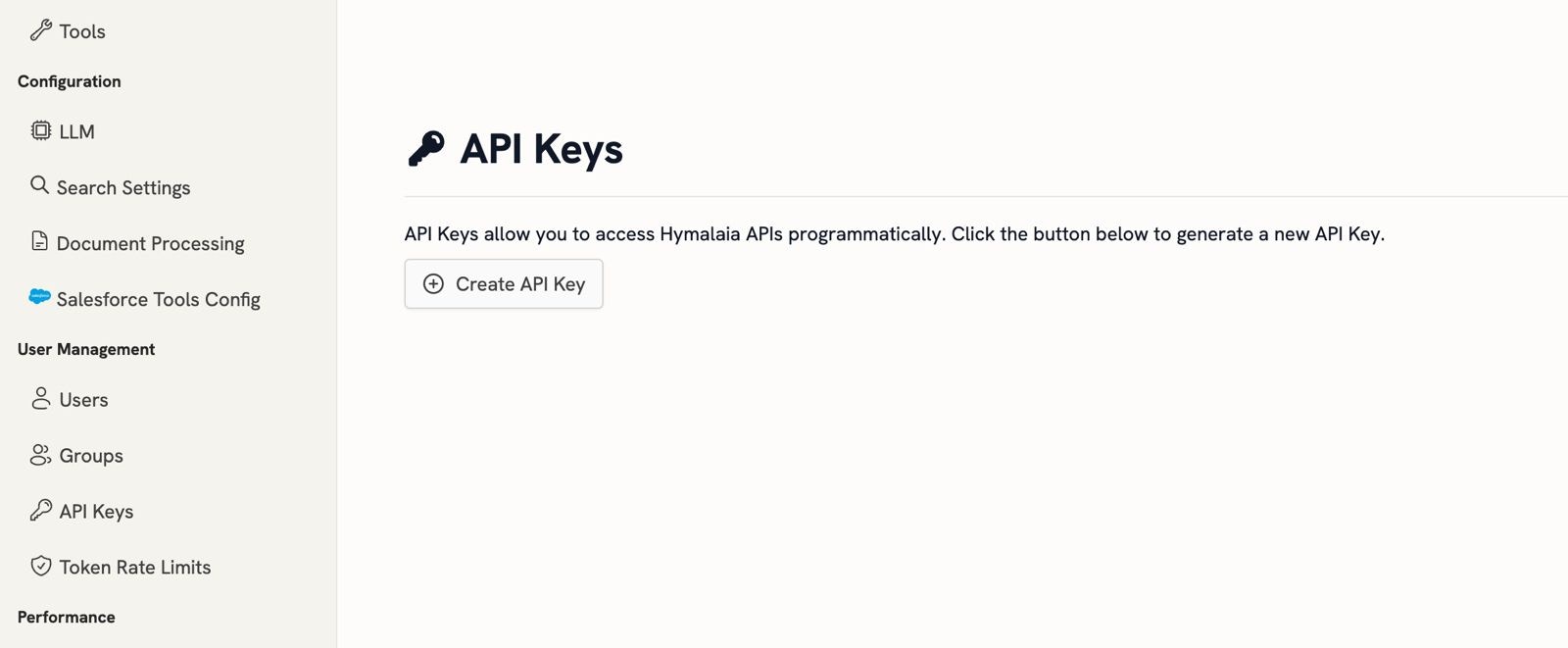 To generate an API key for accessing Hymalaia APIs:
1. Log in to the Hymalaia Admin Panel
2. Navigate to the "API Keys" section in the sidebar
3. Click on the "+ Create API Key" button
4. The system will generate a new API token
5. Copy the generated token
### Using the API Key
Once generated, use the API key in the `Authorization` header:
```bash theme={null}
# Format
-H "Authorization: Bearer YOUR_API_TOKEN"
# Example
-H "Authorization: Bearer on_example_api_token_here"
```
* Keep your API key confidential
* Do not share your API key publicly
* You can generate multiple API keys and revoke them as needed
* Each API key can have specific permissions and access levels
### Best Practices
* Regularly rotate your API keys
* Use different keys for different environments (development, staging, production)
* Implement secure key management in your applications
* Monitor and audit API key usage
To generate an API key for accessing Hymalaia APIs:
1. Log in to the Hymalaia Admin Panel
2. Navigate to the "API Keys" section in the sidebar
3. Click on the "+ Create API Key" button
4. The system will generate a new API token
5. Copy the generated token
### Using the API Key
Once generated, use the API key in the `Authorization` header:
```bash theme={null}
# Format
-H "Authorization: Bearer YOUR_API_TOKEN"
# Example
-H "Authorization: Bearer on_example_api_token_here"
```
* Keep your API key confidential
* Do not share your API key publicly
* You can generate multiple API keys and revoke them as needed
* Each API key can have specific permissions and access levels
### Best Practices
* Regularly rotate your API keys
* Use different keys for different environments (development, staging, production)
* Implement secure key management in your applications
* Monitor and audit API key usage