> ## Documentation Index
> Fetch the complete documentation index at: https://docs.hymalaia.com/llms.txt
> Use this file to discover all available pages before exploring further.
# Ollama
> Configure Hymalaia to use Ollama
To use Ollama with Hymalaia, follow the instructions below.
## 🧾 Prerequisites
You need to have [Ollama](https://ollama.ai/) installed on your system. You can find installation instructions and source code at:
* [Ollama Website](https://ollama.ai/)
* [Ollama GitHub Repository](https://github.com/jmorganca/ollama)
> ⚠️ **Note**: While we support self-hosted LLMs, you will get significantly better responses with more powerful models like GPT-4.
## 🚀 Getting Started with Ollama
1. Install Ollama following the instructions for your operating system
2. Start a model using the command:
```bash theme={null}
ollama run llama2
```
3. Verify the API works with a test request:
```bash theme={null}
curl http://localhost:11434/api/generate -d '{
"model": "llama2",
"prompt":"Why is the sky blue?"
}'
```
## ⚙️ Set Up Hymalaia with Ollama
1. Navigate to the **LLM** page in the Hymalaia Admin Panel
2. Add a **Custom LLM Provider** with the following identifiers:
```bash theme={null}
OllamaLLMProvider1
OllamaLLMProvider2
```
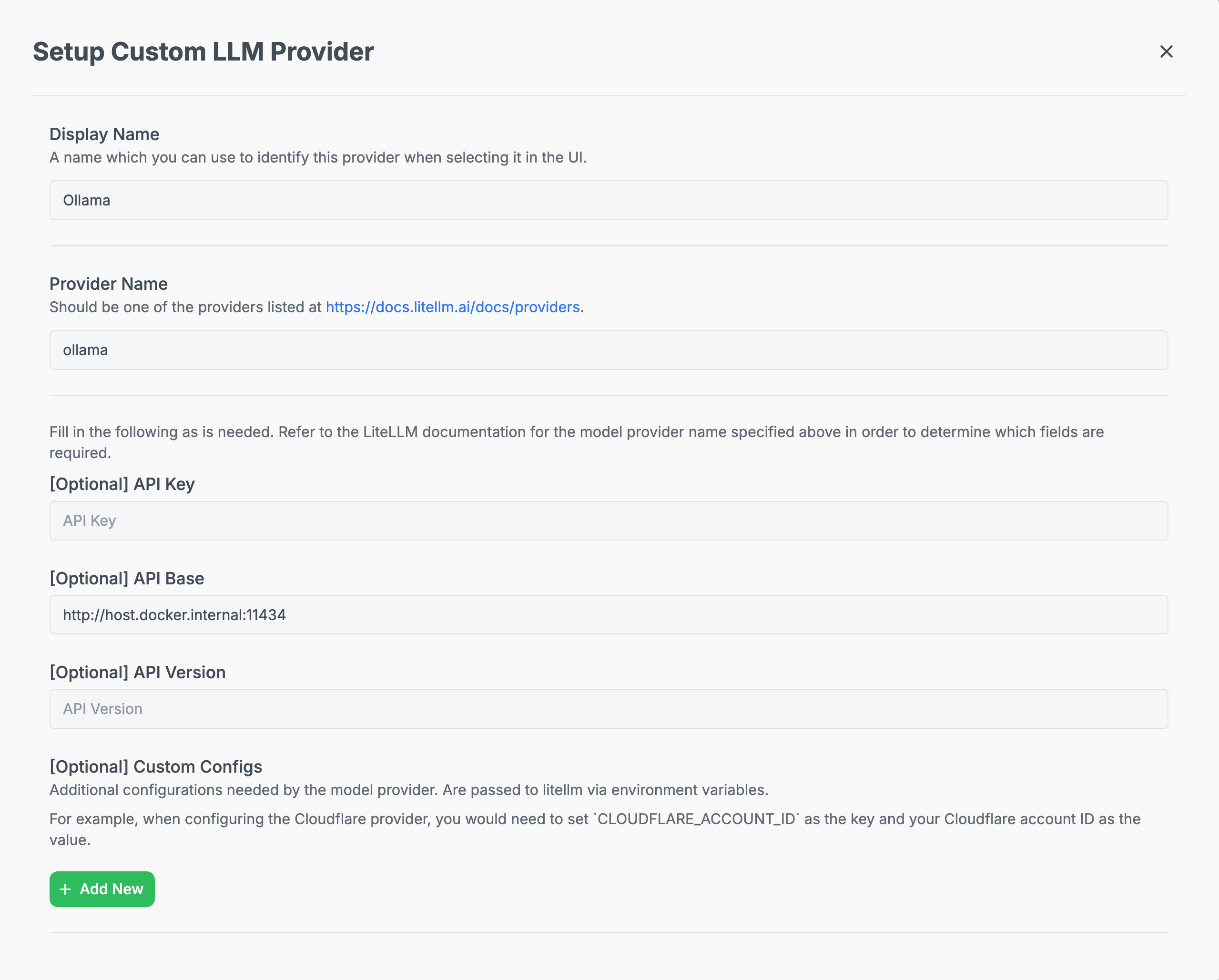
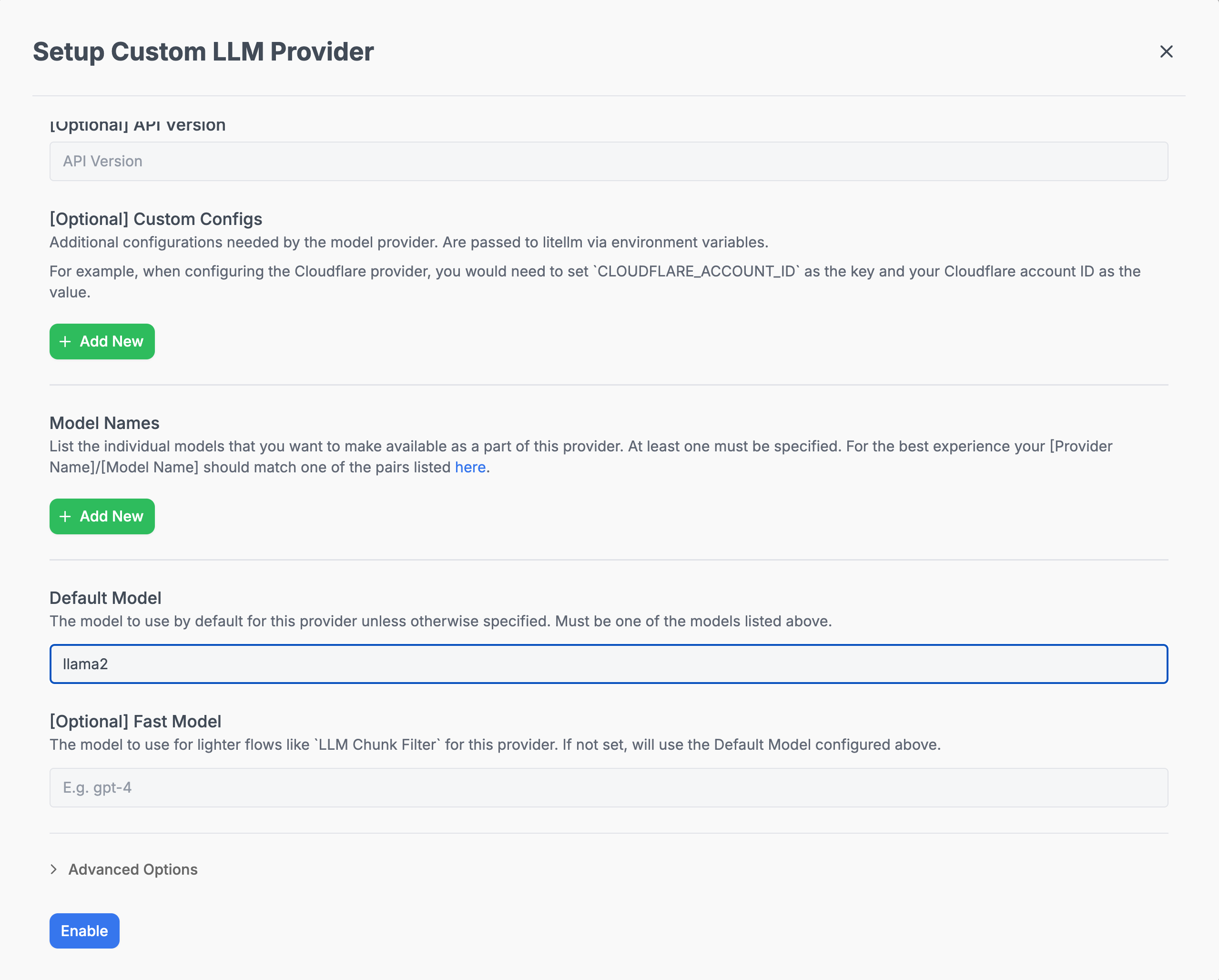 > 🔍 **Note**: For the API Base, when using Docker, point to `host.docker.internal` instead of `localhost` (e.g., `http://host.docker.internal:11434`).
## 🛠️ Environment Configuration
You may want to adjust these environment variables to optimize for locally hosted LLMs:
```bash theme={null}
# Extend timeout for CPU-based model execution
QA_TIMEOUT=120
# Always run search, never skip
DISABLE_LLM_CHOOSE_SEARCH=True
# Disable LLM-based chunk filtering
DISABLE_LLM_CHUNK_FILTER=True
# Disable query rephrasing
DISABLE_LLM_QUERY_REPHRASE=True
# Disable automatic filter extraction
DISABLE_LLM_FILTER_EXTRACTION=True
# Optional: Use simplified prompting for weaker models
# QA_PROMPT_OVERRIDE=weak
```
***
For more detailed setup and environment configuration examples, refer to the [Model Configs](../model_configs).
> 🔍 **Note**: For the API Base, when using Docker, point to `host.docker.internal` instead of `localhost` (e.g., `http://host.docker.internal:11434`).
## 🛠️ Environment Configuration
You may want to adjust these environment variables to optimize for locally hosted LLMs:
```bash theme={null}
# Extend timeout for CPU-based model execution
QA_TIMEOUT=120
# Always run search, never skip
DISABLE_LLM_CHOOSE_SEARCH=True
# Disable LLM-based chunk filtering
DISABLE_LLM_CHUNK_FILTER=True
# Disable query rephrasing
DISABLE_LLM_QUERY_REPHRASE=True
# Disable automatic filter extraction
DISABLE_LLM_FILTER_EXTRACTION=True
# Optional: Use simplified prompting for weaker models
# QA_PROMPT_OVERRIDE=weak
```
***
For more detailed setup and environment configuration examples, refer to the [Model Configs](../model_configs).